
A desktop app for Mac and Windows
Dangle
Grab it, swing it, let go.
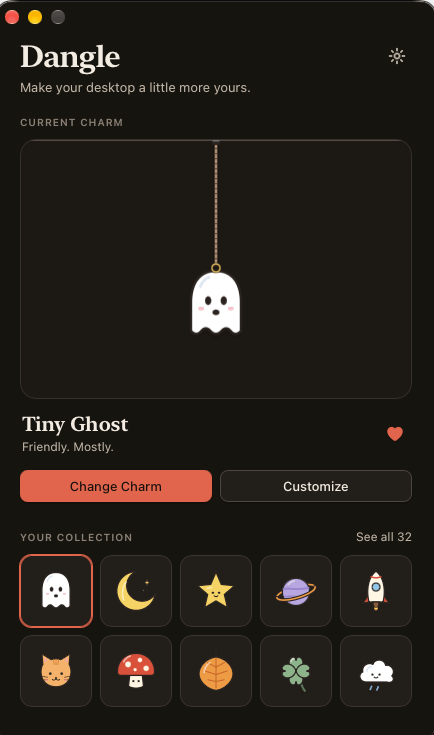
A tiny thing for your desktop. Dangle hangs a small charm on a string from the top of your screen, with a real Verlet-physics string: inertia, damping, release velocity and natural settling.
- macOS (Apple Silicon & Intel)
- Windows 10/11 (x64)
On a real desktop

A real screenshot, not a mockup. The charm hangs above your windows and lets clicks pass through everywhere except the charm itself.
What it does
Real physics
A Verlet string with a heavy charm: inertia, damping, release velocity and natural settling, with slack in the string when the charm is tossed upward.
Stays out of the way
A transparent, frameless charm that sits above your windows. Clicks pass through everywhere except the charm itself, and focus returns to the app you were using when you let go.
30 original charms
Search, categories and favorites in the library, or turn your own PNG, WebP or JPEG image into a charm. The image is validated, resized, background-cut and trimmed on your own computer.
Make it yours
Charm size, string style (Minimal, Thread, Cord, Chain), eight string colors, beads, position, display and motion (Calm, Normal, Bouncy). The string can be 0.5x to 3x long.
Menu bar app
Lives in the menu bar or system tray with global shortcuts, start at login, multiple monitors and a reduce-motion option.
Private by design
No account, no analytics and no network requests. Settings and custom charms are stored only on your computer.
- 30 original charms, or turn your own image into one
- String style, color, length and beads, all customizable
- Menu bar app, global shortcuts, multiple monitors
- Everything stays on your computer. No account, no analytics, no network
Install it
Download the installer for your system from the latest release on GitHub. Dangle is not signed by Apple or Microsoft yet, so your system asks you to confirm once.
macOS
Apple Silicon and Intel, macOS 11 or later. Download the .dmg from the latest release.
- Open the DMG and drag Dangle into Applications.
- The first time only, macOS says it cannot verify Dangle. Click Done, open System Settings, then Privacy & Security, scroll to Security and click Open Anyway next to "Dangle was blocked". Confirm with your password. After that it opens normally.
Windows
Windows 10 and 11, 64-bit. Download the setup .exe from the latest release. No admin rights are needed.
- Run the installer.
- If you see "Windows protected your PC", click More info, then Run anyway. Dangle lives in the system tray.
Shortcuts
- Cmd + Option + D (Windows: Ctrl + Alt + D)
- Show or hide the charm
- Cmd + Option + , (Windows: Ctrl + Alt + ,)
- Open settings
- Option + drag (Windows: Alt + drag)
- Lengthen or shorten the string
Questions
Which systems does Dangle run on?
macOS 11 or later on Apple Silicon and Intel, and Windows 10 and 11 (64-bit).
Why does my computer warn me when I open it?
Dangle is not signed by Apple or Microsoft yet, so macOS and Windows ask you to confirm once. The install steps above show exactly what to click. The full source is on GitHub if you want to inspect it.
Does Dangle collect any data or need the internet?
No. There is no account, no analytics and no network access. Settings and custom charms are stored locally on your computer.
Can I use my own image as a charm?
Yes. Import a PNG, WebP or JPEG and Dangle validates it, resizes it, cuts out the background and trims it, all on your own computer.
Does it work with multiple monitors?
Yes. The charm remembers which display it hangs on, and falls back to the primary display if that one is disconnected.
Are all features the same on Windows and macOS?
Almost. "Show on all desktops" and "Hide when full screen" are macOS-only for now.
Dangle is made by GM Software Labs, the same studio that builds AI, web and mobile products for clients. See what we build.